
Color
On this page
On this page
Don't use color or gradients to indicate AI
AI features use the same colors as other interface elements.
- In a future where AI features are ubiquitous, attracting attention to every AI element across the interface will be overwhelming or distracting.
- The color palette was carefully designed to account for status associations and accessibility requirements.
Do not use gradients and color coding for AI features.
- This avoids conflicting with existing status colors and color associations.
- This avoids the additional accessibility and coding challenges associated with gradients.
- This prevents confusion between hybrid style marketing materials and interface functionality.
Tip
Learn more about how Red Hat uses color in the Red Hat brand, the Red Hat Design System, and PatternFly.
Color associations and statuses
Across Red Hat products, web experiences, and marketing materials, these common color associations are used to communicate with color. Continue to use these same associations for AI features.
| Status or association | Severity level | Color | Use case |
|---|---|---|---|
| Red Hat | 0 | Red | Brand color, use sparingly for most impact |
| Neutral | 0 | Teal | General, no severity |
| Info/note tip | 0 | Purple | Helpful information, previously clicked link |
| Success | 0 | Success green | Success state or an action was successful |
| Null/not available | 0 | Gray | Unavailable or unimportant |
| Link/interaction | 0 | Interaction blue | Link, button, or other interactive element |
| Warning | 1 | Yellow | Act now to avoid a destructive action or error |
| Caution | 2 | Orange | Non-destructive action or fixable error |
| Danger | 3 | Danger red-orange | Destructive action or critical error |
Color do's and don'ts
-
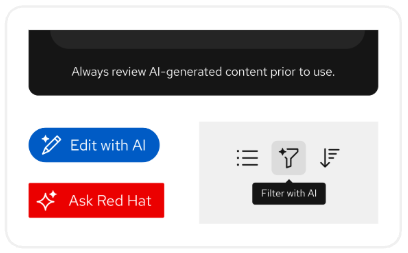
Use the same colors for AI features as the rest of the interface. -
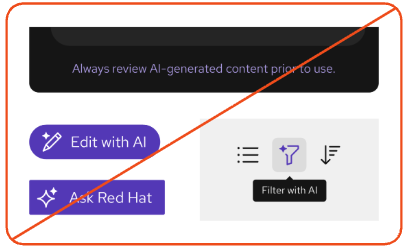
Don't color-code AI features or use colors that are different from the rest of the interface. This could create conflicts with established color associations and statuses. -
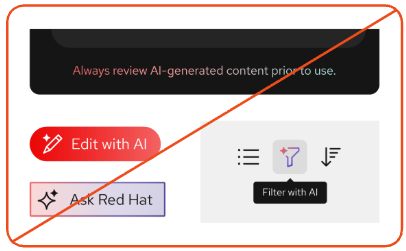
Don't use gradients to indicate that something is or uses AI.
